



Managing money sounds simple until small purchases, recurring bills, cash withdrawals, and transfers start landing in different places. I found Expense IQ Money Manager most useful when I treated it as a daily recording tool rather than a magic solution to financial organization. It is a free finance app from Handy Apps, aimed at combining spending records, planning, and reminders in one place. That broad approach is appealing, but it also means the quality of the results depends heavily on how consistently you enter and review information.
The app has been around since May 14, 2014, and its current version is 2.3.2. It works on devices running Android 4.4 or later, carries an Everyone age rating, and has passed the one-million-install mark. Those details make it approachable for people using older Android hardware, although an older device can still create problems if its storage, date settings, or background behavior are not working properly.
Where Expense IQ Money Manager usually becomes difficult
The first point of friction is not necessarily a broken feature. It is the amount of personal structure you need to decide before the app becomes useful. A money manager asks questions that many people normally avoid: Is a card payment a normal expense or a transfer between accounts? Should a shared grocery purchase be recorded in full, or only your portion? Does a cash withdrawal count as spending immediately, or only when the cash is used?
Expense IQ Money Manager can help you keep these decisions together, but it cannot make them on your behalf. If entries are inconsistent, the reports and budget view will also be inconsistent. I recommend starting with a small number of meaningful categories instead of trying to reproduce every line from a bank statement. “Food,” “transport,” “housing,” and “subscriptions” are usually more useful at the beginning than a long list of tiny labels that you later stop maintaining.
Another common stumbling block is expecting automatic information to appear simply because the app is installed. A personal finance tracker is only as accurate as the records it receives. If a transaction is missing, duplicated, or assigned to the wrong account, the balance may look wrong even though the application is displaying exactly what was entered. This is why I would not use the first screen as proof that everything is synchronized or reconciled.
The most important habit is checking the account balance against reality, not just checking whether the latest transaction appears. After entering several purchases, compare the app’s balance with your bank or wallet. If they differ, look for a forgotten cash purchase, a pending card payment, a transfer entered as an expense, or a transaction dated on the wrong day.
The app’s average rating is 3.2 from around twenty-three thousand ratings, with roughly two thousand eight hundred written reviews. I read that as a sign of mixed experiences rather than a reason to dismiss it. Finance tools often receive poor feedback when setup feels unclear, when a user expects bank-level automation, or when an old backup is difficult to restore. Those concerns matter, but they also show why a careful initial setup is worth the time.
Why the first budget can feel misleading
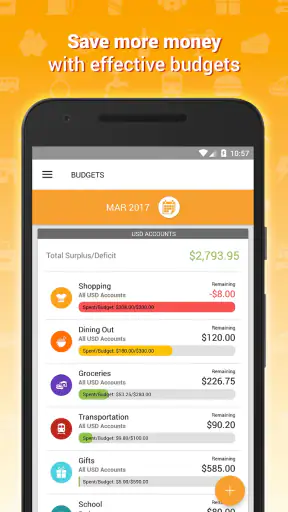
A budget is only meaningful when its period and categories match the way you actually spend. If you begin halfway through a month and compare partial spending with a full monthly limit, the result can look either alarming or reassuring for the wrong reason. I prefer to enter the expenses I already know about, mark the starting point clearly, and then use the next complete spending period as the first serious test.
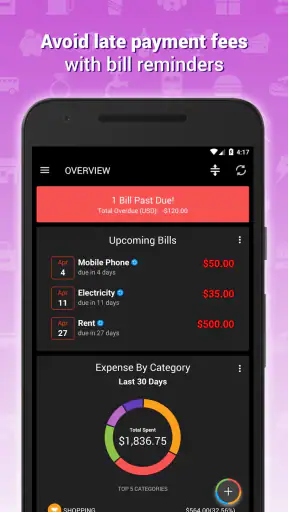
Bills are another area where users can get confused. A reminder is useful because it prompts action, but it does not replace payment confirmation. After paying a bill, I would record the transaction and verify that the reminder is not still being treated as an unpaid obligation. Keeping those two actions separate prevents a reminder from being mistaken for a completed payment.
Setup checks that prevent avoidable problems
When I set up a finance app, I start with the device rather than the categories. The phone’s date, time zone, available storage, and system update behavior can affect any application that handles dated records. If entries appear on the wrong day, first check the device clock. If the app closes during entry, free some storage, close other demanding applications, and restart the phone before assuming the account data is damaged.
Expense IQ Money Manager is free to install, but it includes in-app purchases ranging from $3.49 to $124.99 per item. I would not buy anything simply to solve a basic setup problem. First establish whether the issue is caused by a wrong category, an incorrect account, a date mistake, or a display setting. A purchase should be considered only after you understand what it adds and whether it fits your workflow.
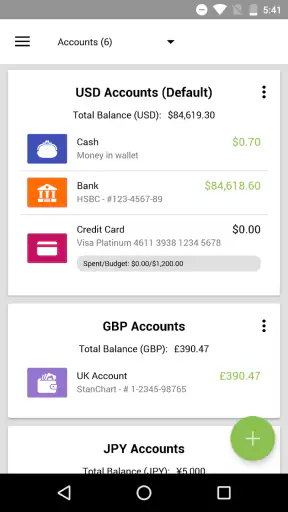
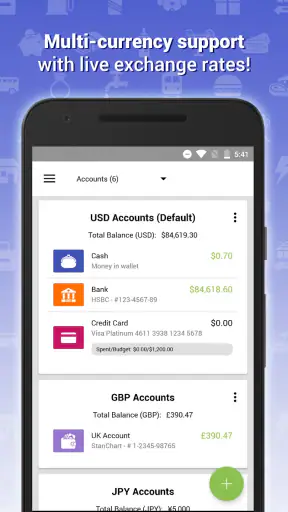
During the first session, I suggest creating only the accounts you genuinely use. For example, you might begin with a main bank account, a card, and cash. Add a savings account if you actively track it, but avoid creating inactive or hypothetical accounts just to make the structure look complete. Too many empty accounts make it harder to see where a real discrepancy started.
Use a consistent rule for transfers. Moving money from checking to savings is not the same as spending it. Likewise, taking cash from a bank account changes the location of the money, while buying lunch with that cash is the actual expense. This distinction is one of the most useful practical lessons in using Expense IQ Money Manager, because treating every movement as spending can make both your balance and your budget unreliable.
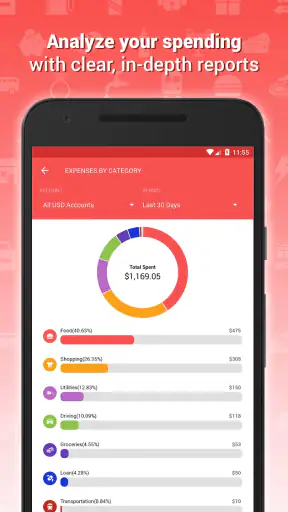
Categories deserve a similar check. If you create separate categories for every shop, your reports may tell you where you bought something but not what kind of spending it represents. I find it more useful to categorize by purpose and use the description field for the merchant or context. That gives you a cleaner view of habits without losing the detail needed to remember a purchase.
Before relying on reminders, enter one or two upcoming bills and inspect how they appear in your routine. Make sure the amount, date, and repeat pattern reflect your real obligation. A reminder entered for the wrong day can be more confusing than no reminder at all, especially when you are using the app to plan money around a salary date.
For privacy and continuity, I would also make a backup plan before entering months of information. Keep your device protected, avoid clearing app data casually, and do not uninstall the app as a first troubleshooting step. If you change phones, investigate the app’s available backup or transfer process before wiping the old device. The safest general rule is simple: preserve the original records until you have confirmed that the replacement setup contains what you need.
A realistic weekly workflow
Imagine that I receive my salary, pay rent, use a card for groceries, buy coffee with cash, and move part of the balance into savings. I would record the salary as income, record rent as an expense, enter the grocery purchase against the card account, record the cash withdrawal as a transfer, and then record the coffee purchase against cash. The savings movement would also be a transfer. That sequence may feel slower than entering everything as an expense, but it produces a balance that reflects where the money actually is.
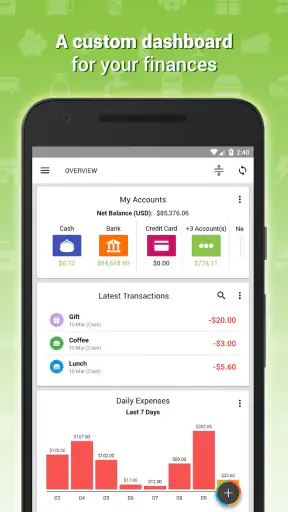
At the end of the week, I would review the account balances first, then the categories, and finally the upcoming bills. This order matters. If the balance is wrong, category analysis can distract you from the real issue. If the balance is right but one category is unexpectedly high, you have a useful question to investigate. If a bill is approaching, you can then decide whether the available money is sufficient.
This workflow is also a good test of whether the app suits you. If recording several transactions each week feels manageable, Expense IQ Money Manager can become a practical personal ledger. If you repeatedly postpone entries and then try to reconstruct a month from memory, the app will probably feel like extra work rather than help.
Recovering when the workflow goes wrong
When a balance does not match, I would avoid deleting large groups of entries immediately. Start from the last point where the app and the real account agreed. Check transactions forward from there, looking for duplicates, reversed signs, transfers recorded as purchases, and cash spending that was never entered. Correcting one clear mistake at a time is safer than rebuilding everything without knowing what caused the difference.
A particularly easy error is entering a card payment twice: once when the purchase is made and again when the card statement is paid. The purchase is the expense. Paying the statement is normally a movement from one account to another, not a second purchase. If your totals suddenly look too high after settling a card, this is one of the first things I would inspect.
Another useful recovery technique is to separate “known” from “estimated.” If you remember spending money but cannot recall the exact merchant, enter a clear description and use a reasonable category rather than inventing precise detail. Later, when you check a statement or receipt, edit the entry. A transparent approximate record is easier to correct than several guessed transactions that look exact.
If the application behaves strangely after an update or a device restart, begin with safe checks: close and reopen it, restart the phone, confirm that the operating system meets the minimum requirement, and ensure there is enough free storage. If the issue affects only one entry, inspect that entry before treating the entire database as faulty. If it affects every screen or prevents access to your records, preserve any available backup before reinstalling or clearing data.
Do not confuse a display problem with a financial problem. A total may look different because you changed the selected period, account, or category filter. Before editing transactions, reset the view and check whether the missing item is simply outside the current date range. This small check can save a lot of unnecessary corrections.
When the app is not the cause
Some problems belong to the surrounding financial system. A bank may show a pending payment before it becomes final, a merchant may place a temporary authorization, or a transfer may appear at different times in two accounts. Expense IQ Money Manager cannot make those external records settle faster. In such cases, keep your entry understandable and update it when the real transaction is confirmed instead of repeatedly adding new entries.
Similarly, a budget can appear to fail because the original limit was unrealistic. If a household spends more on transport during a particular season, lowering the category limit will not change the underlying cost. The app can expose that pattern, but the decision about whether to reduce trips, move money from another category, or accept the higher limit is yours.
People managing several currencies, shared household finances, investments, or detailed business bookkeeping should think carefully before choosing this app as their only system. A simple personal ledger is a different job from tax-ready accounting or a live banking dashboard. If automatic bank feeds, specialist investment tracking, or formal invoicing are central requirements, a dedicated service may be a better match than trying to force this app into that role.
On the other hand, users who want to understand everyday spending without handing their entire financial routine to a bank interface may appreciate the more deliberate approach. Compared with a spreadsheet, the app is easier to use repeatedly on a phone and gives your records a finance-focused structure. Compared with a bank’s built-in spending screen, it can be more adaptable because you are deciding what to record and how to classify it. The trade-off is that the responsibility for accurate entry remains with you.
I would also skip it if you need a completely hands-off experience. The broad promise of combining expense tracking, budgeting, and bill reminders is attractive, but those tools only work well when you maintain the underlying information. Someone who wants automatic categorization and immediate bank synchronization may be happier with a modern banking or budgeting service designed around those functions.
My practical verdict after using it as a daily money ledger
Expense IQ Money Manager is best understood as a structured companion for people willing to pay attention to their money. Its useful side is not a single clever screen; it is the way income, spending, account movements, planned limits, and bill prompts can be considered together. I found the approach most valuable for spotting small leaks, preparing for recurring payments, and making sure cash and card spending are not forgotten.
The app is not ideal for someone who expects installation alone to produce a complete financial picture. Setup choices matter, and recovery requires patience when balances diverge. Older Android support is welcome, but it does not remove ordinary device issues. The mixed average of 3.2 also suggests that prospective users should approach it with realistic expectations instead of assuming every workflow will feel effortless.
For a practical trial, I would use it for one full spending cycle with three or four accounts at most. Record purchases on the same day, treat transfers separately, check the real balances once a week, and review reminders before each bill is due. That test will tell you more than a quick glance at the feature list. If the routine makes your finances clearer without becoming a burden, the free entry point makes it worth keeping.
My recommendation is therefore conditional but positive: choose it if you want an intentional, phone-based record of personal spending and are prepared to maintain it. Choose another kind of tool if automation, live bank data, business accounting, or advanced investment management is your priority. For the right user, this app can turn vague money worries into visible patterns; for the wrong user, it can simply become another list that needs updating.


